Tuesday, August 31, 2010

VMWare black screen of death

Ever had a black screen when loading up a VMWare image?  Try booting into safe mode and deleting your display adapter from Device Manager, then restarting.  (Don’t worry, the adapter should reinstall automatically.)

Device Manager

This issue seems to appear after changing monitors – in my case, when I unplug an external monitor from my laptop.  I’m running a Windows Server 2008 guest VM on a Windows 7 host, under VMWare Player 3.1.0.

Another workaround here.

Monday, August 23, 2010

iPhone 3G running slow on iOS 4? Time to jailbreak

Update (26/10): Apple have released iOS 4.1, which pretty much fixes the speed issues on the 3G.


I’ve been slow to the iPhone jailbreaking party, but I just found the killer app for my 3G – overclocking.

Since upgrading to OS 4.0, my iPhone has been dog slow.  Apple have confirmed this is an issue and are working on a fix, but in the meantime you can do something about it have released a fix, woo.

Disclaimer: at the very least this could make your iPhone run hotter and increase battery consumption – worst case, it could brick it.  But if you think it’s worth the risk then keep reading…

To get your iPhone 3G to run at 600 MHz (normally 421 MHz), follow these instructions:

  1. Backup your iPhone through iTunes
  2. Jailbreak: open Safari on your phone, browse to www.jailbreakme.com and follow instructions [Note – iOS 4.0.2+ is not supported, so if you’ve already upgraded then restore a previous backup first]
  3. Follow instructions to overclock (I used iFile rather than SSH)

You should notice that apps like Google Maps run much faster now.  This hack also works on the 3GS.

Some more benefits of jailbreaking:

On the last point - I’m not suggesting you go and download apps like TomTom without paying for them, but there are plenty of legitimate apps that for some reason Apple haven’t approved.

And in case you were still worried…

  • Jailbreaking is completely legal (in the US at least)
  • All existing iPhone functionality will still work, including syncing with iTunes and the App Store
  • You can completely reverse the jailbreak by restoring a previous backup of your iPhone

On the downside, your phone might crash a bit more (not that I’ve noticed) and you won’t be able to get the latest official iPhone updates until they’ve been cracked by the jailbreak community.

Showing Delicious bookmarks in your Blogger sidebar

I thought this would be easy, but not so much.  Here are a few options:

1. Delicious linkrolls

Great idea, but this doesn’t seem to work with Blogger; paste the script into http://www.blogger.com/add-widget, and you just get an empty element on your blog… neat.

2. Widgetbox

There are a few widgets that claim to be Delicious feeds, but they all look pants.  And the free version requires you to have a  big fat Widgetbox advert.

3. Blogger’s “Feed” gadget

This is what I went for – it works, and it doesn’t suck too much.

Just add a gadget to your blog, select “Feed” from the list, and put in your URL (e.g. http://www.delicious.com/duncsmith).

One small thing – there seems to be a bug where the feed URL has “count=15” at the end, which doesn’t give you the latest bookmarks.  You need to change this number to match the number of items to show (max = 5).

Monday, June 7, 2010

Using T4 to generate ‘Specified’ properties for a WCF proxy

Visual Studio 2008 makes it very easy to generate a set of WCF proxy classes: just add a service reference.  Sometimes though, you’ll want to alter the behaviour of the generated classes – especially since the WCF Proxy Generator has some shortcomings.

I’m going to outline a simple way to do this using Visual Studio’s built-in code generator (T4) and a bit of XPath.

Here’s a typical problem that you might encounter with the proxy generator; let’s say our WSDL contains a PayrollNumber element:

  1. <xs:simpleType name="String1">
  2.   <xs:restriction base="xs:string">
  3.     <xs:minLength value="1" />
  4.   </xs:restriction>
  5. </xs:simpleType>
  6. ...
  7. <xs:element minOccurs="0" name="PayrollNumber" type="cc:String1"/>

Some things to note about this element:

  1. It’s a string
  2. It’s optional (minOccurs=“0”)
  3. If specified, it has a minimum length of 1

The WCF Proxy Generator will give you something like this:

  1. [Serializable, XmlType]
  2. public partial class MyClass
  3. {
  4.     [XmlElement]
  5.     public string PayrollNumber { get; set; }

If you leave this property null and call the WCF service, it will send an empty element, leading to an invalid XML schema.  Running a schema validator will give you a big fat  XMLSchemaValidationException:

The value ‘’ is invalid according to its datatype ... The actual length is less than the MinLength value.

What we actually want is for the element to be left out of the request (it's optional after all).  This is a known issue with the proxy generator, and one workaround is to manually add a ‘Specified’ property to the class, which will be picked up by the XML serializer:

  1. [XmlIgnore]
  2. public bool PayrollNumberSpecified
  3. {
  4.     get { return PayrollNumber != null; }
  5. }

Since the proxy classes are partial, we can add this property to our own partial class of the same name.  Even better, we can auto-generate these partial classes using a T4 script that parses the WSDL.

To do this, create a new file in Visual Studio called [ServiceName].tt, and paste in the following (you’ll need to change the namespace etc):

Update (30/7): download the latest version.

  1. <#@ hostspecific="true" language="C#" #>
  2. <#@ name="System.Core" #>
  3. <#@ name="System.Xml" #>
  4. <#@ namespace="System.Xml" #>
  5. <#@ namespace="System.Collections.Generic" #>
  6. <#@ namespace="System.IO" #>
  7. #pragma warning disable 1591
  8. // <autogenerated>
  9. // This code was generated by a tool. Any changes made manually will be lost
  10. // the next time this code is regenerated.
  11. // </autogenerated>
  12.    using System.Xml.Serialization;
  13.  
  14. namespace MyNamespace.MyService
  15. {<#
  16.     XmlDocument doc = new XmlDocument();
  17.     string absolutePath = Host.ResolvePath(@"..\Service References\\cf8MyService\\cf8service.wsdl");
  18.     doc.Load(absolutePath);
  19.    
  20.     XmlNamespaceManager ns = new XmlNamespaceManager(doc.NameTable);
  21.     ns.AddNamespace("xs", "http://www.w3.org/2001/XMLSchema");
  22.    
  23.     foreach(XmlNode ndClass in doc.SelectNodes(@"//xs:complexType[@name]", ns))
  24.     {
  25.         bool createdClass = false;
  26.         foreach(XmlNode ndProp in ndClass.SelectNodes(@"./xs:sequence/xs:element[starts-with(@type, 'cc:String') and @minOccurs='0' and not(@maxOccurs)]", ns))
  27.         {
  28.             if (!createdClass) {
  29. #>
  30.    
  31.     public partial class <#= ndClass.Attributes["name"].InnerText #>
  32.     {
  33. <#
  34.                 createdClass = true;
  35.             }
  36.        
  37.             string fieldName = ndProp.Attributes["name"].InnerText;
  38. #>
  39.         [XmlIgnore]
  40.         public bool <#= fieldName #>Specified { get { return !string.IsNullOrEmpty(<#= fieldName #>); } }
  41.        
  42. <#        }
  43.         if (createdClass) {
  44. #>    }
  45. <#
  46.         }   
  47.     } #>
  48. }
  49. #pragma warning restore 1591

A brief explanation:

  • Uses Host.ResolvePath to get the path of the WSDL file
  • Uses XPath to select all string elements with minOccurs=‘0’
  • Generates partial classes with ‘Specified’ properties for each corresponding element

When you hit Save, a new file called [ServiceName].cs will be generated, containing a list of partial classes.

Thursday, March 11, 2010

Multiple vsmdi files with VS 2008: the path to freedom

If you use a combination of Visual Studio 2008, MSTest and TFS, you've probably come across this problem at some point. Your solution folder is suddenly full of vsmdi files:


You may have worked out that Visual Studio generates a vsmdi file the first time you run unit tests with MSTest. This file basically stores the list of tests that will be ignored.

The problem comes when multiple developers are running tests at the same time – rather than checking out the same vsmdi file, your Visual Studio will "helpfully" create a new one, adding it to source control.

The best solution seems to be to exclude these files from source control altogether:

1) Delete all .vsmdi files from both source control and your local solution folder

2) Open the solution in Visual Studio

3) Open Test View (Test > Windows) and toggle the "enabled" property of a random test - this will force it to create a new .vsmdi file


4) In Solution Explorer, select the new vsmdi file (should be under Solution Items), right-click it and Undo Pending Changes

5) With the file still selected, click File > Source Control > Exclude [file] from Source Control

6) Check in

As long as everyone now "gets latest", you should each end up with a single writeable vsmdi.

Tuesday, February 16, 2010

Restoring notes from an iPhone backup

My iPhone got really slow the other week, and the local Apple Genius suggested a full restore to get it back to factory settings. Fair enough, it seemed to fix the problem, and after syncing with iTunes I had all my apps back, only....

No more notes.

It turns out that iTunes doesn't sync the data from the Notes app, so the only way to get them back is from an old backup. A quick Google turned up various tricks involving Grep, Python and Mac-related tools for extracting data from the iPhone backup files, but there's a much simpler way. And it works in Windows too.

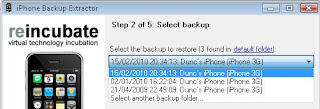
1) Run Backup Extractor for iPhone (Reincubate, trial).

The trial lets you extract one SQLite database file (.db) at a time from a backup file.


Choose an iPhone backup, then select which database to restore (in this case, Library > Notes).


2) Run SQLite Data Wizard (SQLMaestro, trial).

Select the file from above, choose your output format (e.g. CSV) and the note_bodies table.


You should now have your beloved iPhone notes back, in the format of your choice.